

CPU vs GPU vs TPU vs NPU: Why Your Phone Needs Different Brains
- Posted on November 8, 2026
- AI Tools
- By MmantraTech
- 12 Views
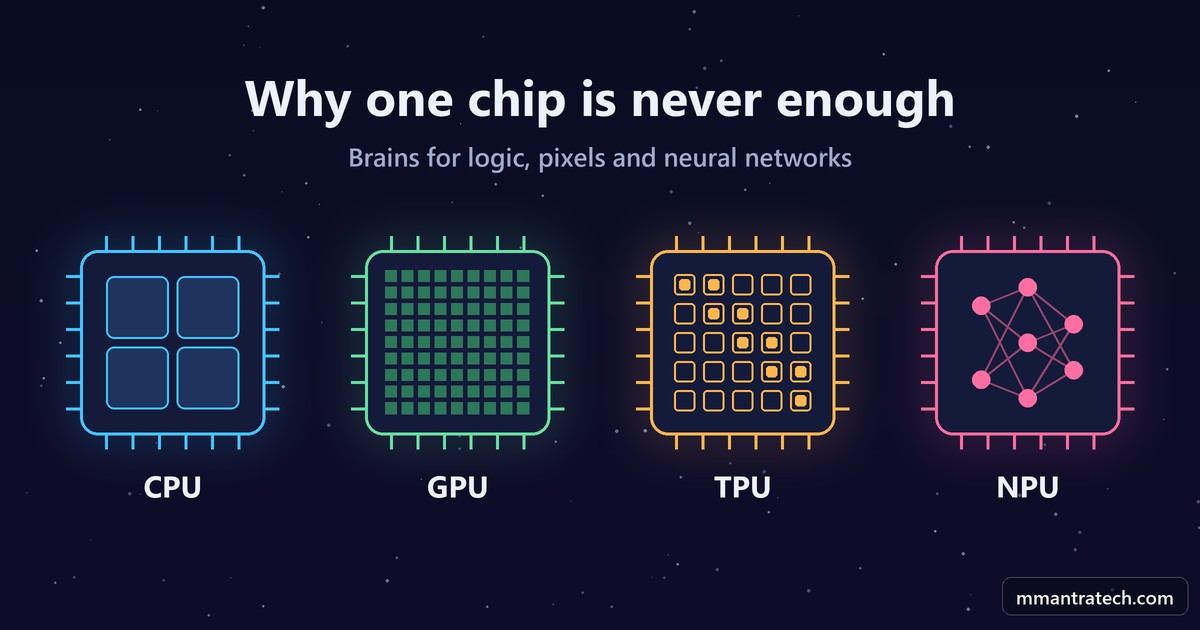
Pick up your phone and scroll for one second. In that second, one chip decided what your finger touched, another painted millions of pixels, and a third may have quietly recognized a face in your gallery.
Why does a phone need different chips for this? Why can't one chip do everything? In this breakdown of CPU vs GPU vs TPU vs NPU, we will answer that question step by step. Each chip exists because the one before it hit a wall, and once you see those walls, the whole design makes sense.
Table of Contents
- The kitchen analogy we will use
- What a CPU actually does
- The power wall: why chips stopped getting faster
- The GPU: when work does not depend on itself
- How gaming chips accidentally powered AI
- The memory wall: math is cheap, moving data is not
- The TPU: Google's answer to a scary calculation
- The NPU inside your phone
- CPU vs GPU vs TPU vs NPU: side-by-side comparison
- FAQ
- Conclusion
The kitchen analogy we will use
Before any technical word, picture a big wedding kitchen. Three very different kinds of workers are needed there.
- The head chef can cook any recipe. Recipes have steps that depend on each other: you can't add the tadka before the oil is hot.
- Hundreds of helpers each roll one roti at the same time. No roti cares about the roti next to it.
- An assembly counter where each station keeps its own spice jar, and the plate moves from station to station.
Keep these three in mind. The head chef is the CPU. The helpers are the GPU. The assembly counter is the TPU, and the NPU is a small version of that counter fitted inside your phone. Now let's see why each one was needed.
What a CPU actually does
The CPU, or Central Processing Unit, is a small piece of silicon with billions of transistors. And all those transistors exist to run one very simple loop.
Fetch the next instruction from memory, decode what it means, execute it. Then repeat, billions of times every second.
This fetch, decode, execute loop is the base of all computer architecture. If you want to know what these instructions look like underneath your code, read my post on binary, assembly, compilers and interpreters.
So what is a core?
A core is one complete set of circuits that can run this loop on its own. One core can run a full program from start to end without help. So when a phone says "octa-core", it means one chip with eight of these complete processors inside.
The surprising part: most of a core is not doing math
Here is something most people never hear in college. A large part of every CPU core does no calculation at all. Its whole job is to stop the core from waiting, using three tricks.
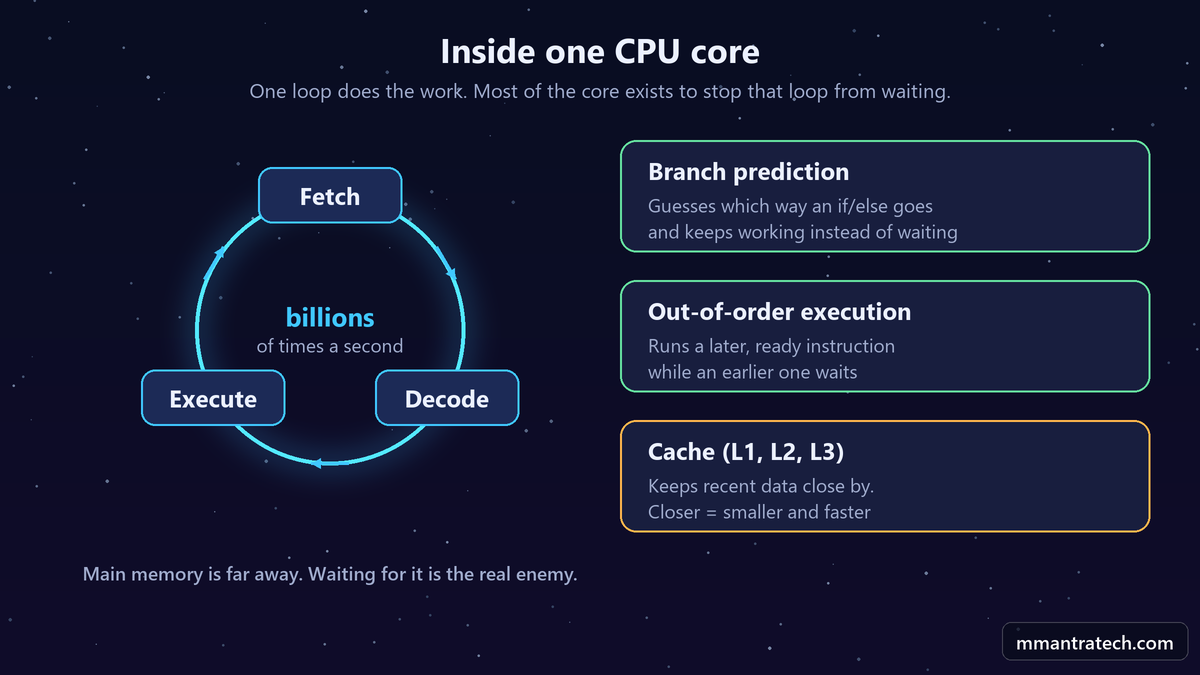
1. Branch prediction. Your code is full of if and else. The CPU doesn't wait to find out which way the condition goes. It looks at what happened the last many times, makes a guess, and keeps working. This is called speculative execution. If the guess was wrong, it throws that work away and starts again. Modern predictors are right most of the time, which is why this trick pays off.
2. Out-of-order execution. Say instruction 3 is waiting for data from memory, but instruction 5 has nothing to do with it. The CPU runs instruction 5 first instead of sitting idle.
3. Cache. Main memory is far away, and going there is slow. So the CPU keeps recently used data close by, in levels called L1, L2 and L3. The closer the cache, the smaller and faster it is. Programs usually reuse data they touched a moment ago, so this works very well.
See branch prediction with your own eyes
This small C program adds up numbers bigger than 127. It runs the same loop twice on the same data. The only difference: the second time, the data is sorted.
// Same data, same loop. Only the order of the data changes.
#include <stdio.h>
#include <stdlib.h>
#include <time.h>

#define N 1000000

static int cmp(const void *a, const void *b) { return *(const int *)a - *(const int *)b; }

static double run(const int *data) {
    clock_t start = clock();
    long long sum = 0;
    for (int round = 0; round < 100; round++)
        for (int i = 0; i < N; i++)
            if (data[i] >= 128)   // the branch the CPU has to guess
                sum += data[i];
    double secs = (double)(clock() - start) / CLOCKS_PER_SEC;
    printf("  sum = %lld\n", sum);
    return secs;
}

int main(void) {
    int *data = malloc(N * sizeof(int));
    srand(42);
    for (int i = 0; i < N; i++) data[i] = rand() % 256;

    printf("Random order:\n");
    double t1 = run(data);
    qsort(data, N, sizeof(int), cmp);
    printf("Sorted order:\n");
    double t2 = run(data);

    printf("Random: %.2f s   Sorted: %.2f s\n", t1, t2);
    free(data);
    return 0;
}
Compile it with gcc -O1 branch_demo.c -o branch_demo and run it. On an ordinary Windows laptop, the random run took about 1.2 seconds and the sorted run about 0.16 seconds. That is roughly seven times faster for exactly the same work.
Why? With random data, the if is a coin toss, so the CPU keeps guessing wrong and throwing work away. With sorted data, the answer is "no, no, no..." and then "yes, yes, yes...", so the guess is almost always right. Your numbers will be different on your machine. And if you use higher optimization flags, the compiler may remove the branch entirely, so the gap can disappear.
New to C? Start with my introduction to the C language.
The power wall: why chips stopped getting faster
For decades, the plan was simple. Every new generation of chips ran at a higher clock speed, and your old code got faster for free. Developers didn't have to do anything.
Then, in the early 2000s, it stopped. The reason is physics.
Every time a transistor switches, it uses a little energy and makes a little heat. A chip has billions of them. The clock speed is how many times per second they switch. Push the clock higher and the heat climbs with it. Stanford professor Mark Horowitz described how processors hit the power wall for normal air cooling at around 100 watts. Beyond that, keeping the chip cool became the real problem.
This creates another question: if one core can't get faster, what can we do?
The answer engineers picked was to add more cores instead. That is why phones now advertise eight cores. But here's the catch. Four cores are not automatically twice as fast as two.
Why more cores don't simply mean more speed
Most real work has dependencies. Step B needs the result of step A. Step C needs B. Back in our kitchen, two extra head chefs don't help if every step of the recipe waits for the previous one.
So the big question became: is there any work that has almost no dependencies at all?
There is. And it is happening on your screen right now.
The GPU: when work does not depend on itself
Your screen has millions of pixels. For every frame, each pixel needs to know its color. And here is the key point: one pixel doesn't care what color its neighbour is. Together they make a picture, but each calculation is independent.
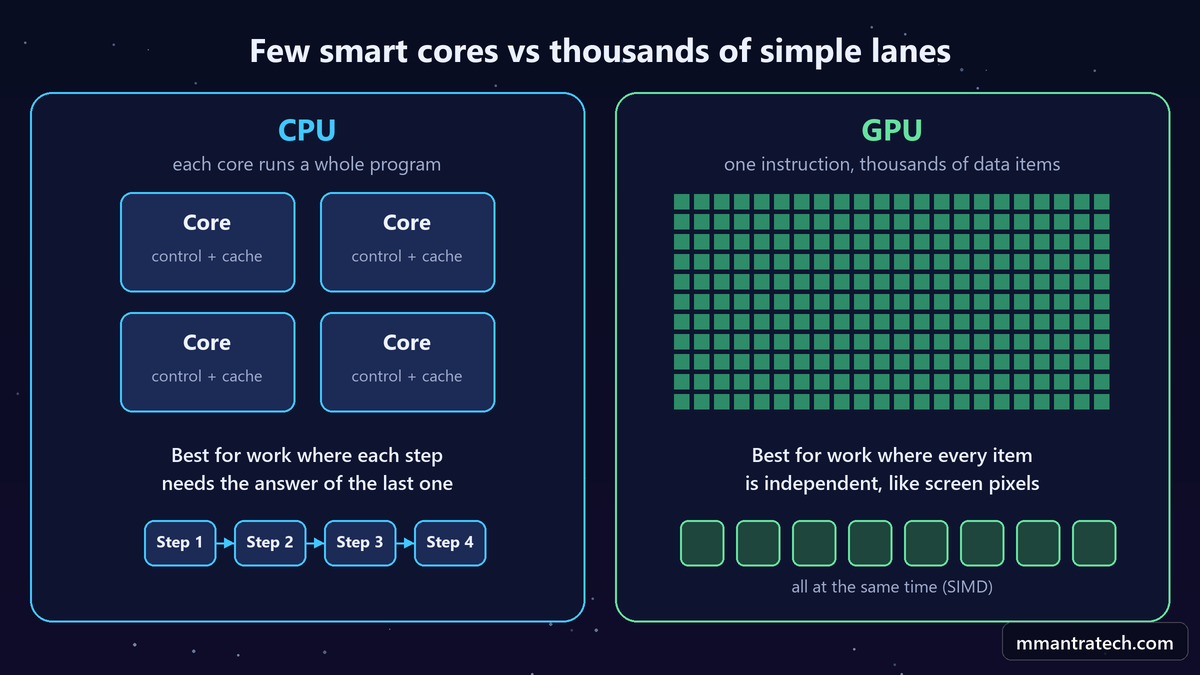
That means you can calculate millions of pixels at literally the same time. For that, you don't need clever head chefs. You need lots of simple helpers. No branch prediction, no out-of-order tricks, just many small units doing the same math.
SIMD means Single Instruction, Multiple Data: one instruction applied to thousands of pieces of data at once. This is the core idea of the GPU, the Graphics Processing Unit.
Why "5,000 GPU cores vs 8 CPU cores" is a misleading comparison
When a GPU spec sheet says it has thousands of cores, those are not the same thing as CPU cores. A CPU core can run a whole operating system or browser by itself. A GPU core is a small execution unit that can multiply and add. On its own it can't run any program.
So comparing the two numbers is like comparing one head chef with one roti helper. Different jobs, different sizes.
The math behind every pixel
Rotating a 3D world, calculating light, moving the camera angle: almost all of it is matrix multiplication. One grid of numbers multiplied by another grid, again and again, crores of times. GPUs were built to do exactly this, for games. Nobody planned what happened next.
How gaming chips accidentally powered AI
In 2012 there was a competition called ImageNet. Computers had to recognize what was in photos across a thousand categories. That year, a team from the University of Toronto entered a neural network that beat everyone by a huge margin: about 15.3% top-5 error against 26.2% for the next best entry.
What did they train it on? Two GTX 580 gaming graphics cards. The same kind you could buy for a gaming PC.
Why did that work so well? Because a neural network, underneath, is mostly matrix multiplication. Look how small one layer becomes in code:
# One layer of a neural network is just a matrix multiply plus a bias
import numpy as np

rng = np.random.default_rng(7)
inputs  = rng.random((32, 512))    # 32 examples, 512 numbers each
weights = rng.random((512, 256))   # what the layer has learned
bias    = rng.random(256)

outputs = inputs @ weights + bias  # the whole layer, in one line

print("output shape:", outputs.shape)
print("multiply-adds:", 32 * 512 * 256)
Output:
output shape: (32, 256)
multiply-adds: 4194304
Over four million multiply-adds for one small layer and one small batch. Real models have many layers and far bigger sizes. This is the same kind of math GPUs had been doing for pixels for years. Hardware built for games became the engine of modern AI. If you like this history, read my post on the evolution of AI in six shifts.
The memory wall: math is cheap, moving data is not
GPUs made AI possible. But after a few years, people noticed something strange. A GPU has thousands of multiply units, and a lot of the time many of them were sitting idle.
Waiting for what? For data.
The numbers live in memory. The multiply units sit on the chip. For each multiply, numbers have to travel from memory to the chip, and results have to travel back. Multiplying two numbers is almost free. Bringing those two numbers from memory is not.
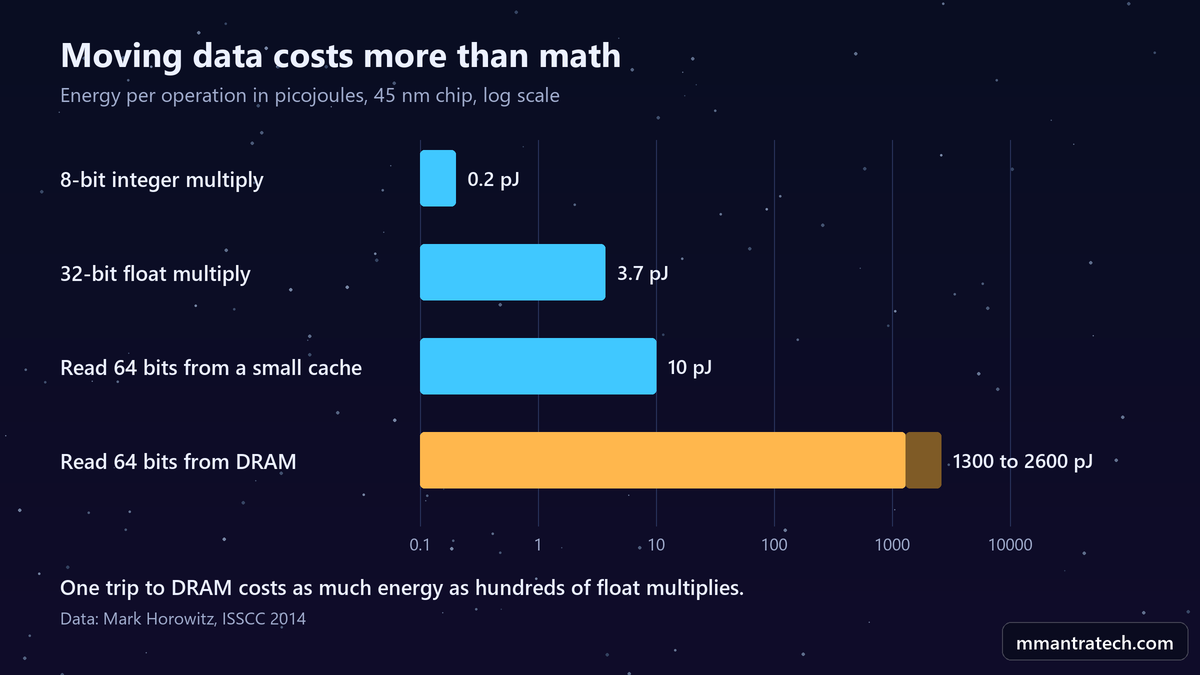
Look at the gap in that chart, using Horowitz's numbers. A 32-bit float multiply costs about 3.7 picojoules. Reading 64 bits from DRAM costs about 1,300 to 2,600 picojoules. So one trip to main memory can cost as much energy as hundreds of multiplications.
Two terms are worth knowing here:
- Memory bandwidth: how much data can move from memory to the chip every second.
- Memory-bound: when a chip's speed depends on waiting for memory, not on how fast it can calculate.
This was the second big limit. Engineers call it the memory wall.
The TPU: Google's answer to a scary calculation
In 2013, Google did a simple calculation. What if people used voice search for just three minutes a day?
The answer, written in Google's own TPU research paper, was alarming:
"The conversation changed in 2013 when a projection where people use voice search for 3 minutes a day using speech recognition DNNs would require our datacenters to double to meet computation demands, which would be very expensive to satisfy with conventional CPUs."
Read that again. Three minutes a day per person, and the biggest computer network on the planet would need to double. CPUs couldn't handle it. GPUs could, but they were memory-bound. So Google set a goal to improve cost-performance by 10 times over GPUs, and built its own chip. It went from design to running in datacenters in just 15 months.
That chip is the TPU, the Tensor Processing Unit. Its whole idea fits in one line:
If going to memory is expensive, stop going to memory.
The systolic array, in plain English
The heart of the first TPU is a block called a systolic array. The name sounds complicated, but the idea is simple. It is a grid of 256 rows and 256 columns, which is 65,536 tiny units.
Each unit does just one thing: multiply two numbers and add the result to a running total. This is called multiply-accumulate.
Now the clever part. The weights, the numbers the neural network has learned, are loaded into the grid and stay there. The input data flows through the grid instead.
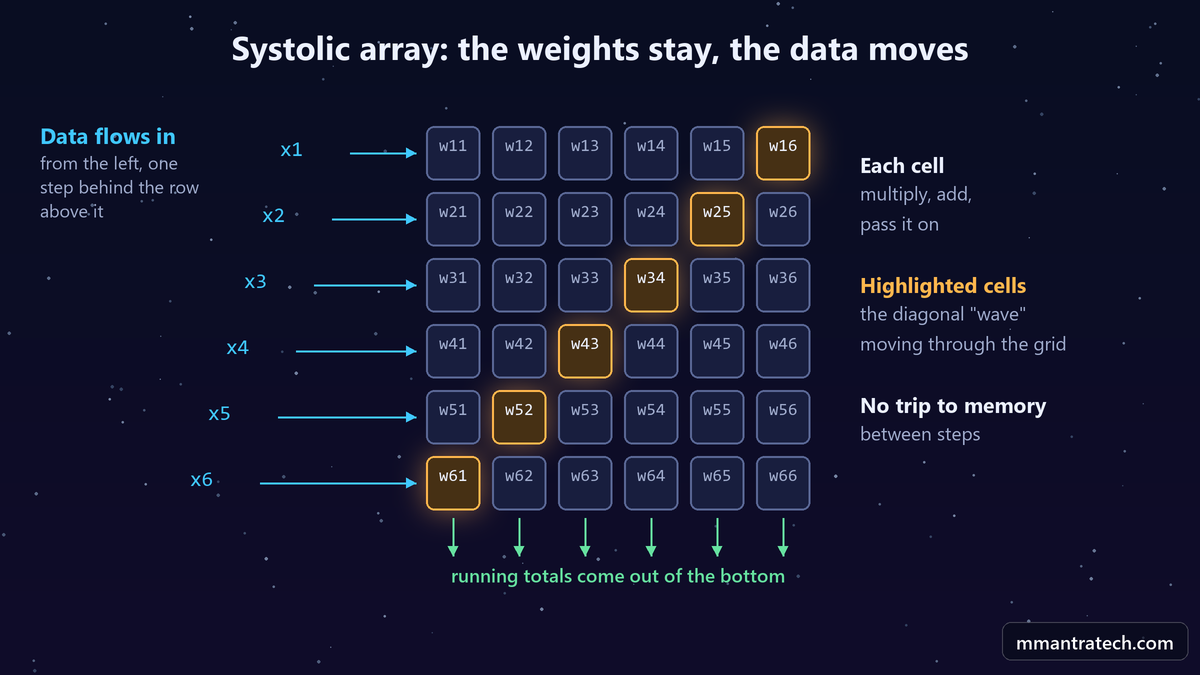
Google's paper describes it like this: "A given 256-element multiply-accumulate operation moves through the matrix as a diagonal wavefront." The name "systolic" comes from the heart, because data moves through the chip in waves, like a heartbeat pumping blood.
Remember our assembly counter? Each station keeps its spice jar. The plate moves. Nobody runs back to the store for every pinch of masala.
Compare the two approaches:
- Old way: for each multiply, fetch numbers from memory, use them, send the result back.
- TPU way: a number comes in once and gets reused across a whole row of units before it leaves.
The result? According to Google's paper, the first TPU was about 15 to 30 times faster and 30 to 80 times more energy efficient on its AI inference workloads than the CPUs and GPUs of that time.
And notice why. The TPU is not "smarter" than a CPU or a GPU. It wins because it avoids the memory wall.
The NPU inside your phone
Your phone doesn't have separate chips scattered on a board. It has one chip called an SoC, or System on a Chip. Things that used to sit separately on a motherboard are now blocks on a single piece of silicon, and each block is designed differently.
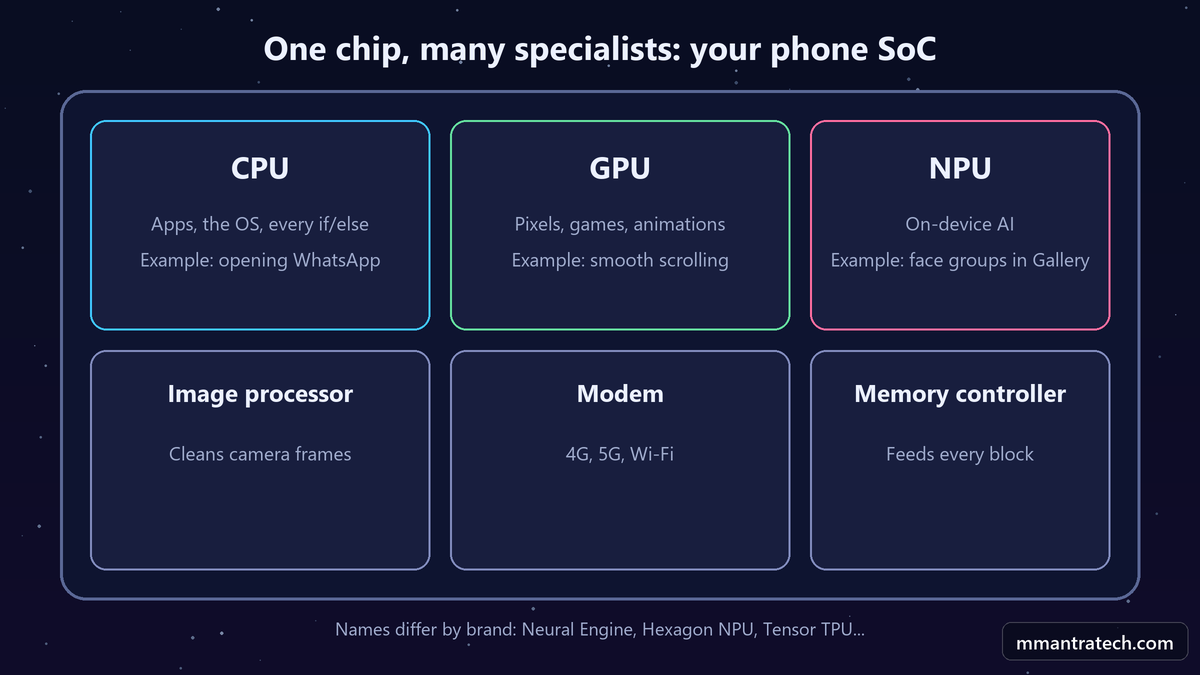
One block is the CPU. One is the GPU. And for some years now, phones also have a third block for AI: the NPU, or Neural Processing Unit. Every company gives it its own name. Apple calls it the Neural Engine, Qualcomm uses the Hexagon NPU, and Google builds a TPU into its Tensor chips.
It follows the same idea as the TPU: a fixed grid of multiply-accumulate units, made only for neural networks, small and power-efficient enough for a phone battery.
When does it run? When your gallery groups photos by the people in them, for example. On many phones, that kind of work can happen on the device itself instead of a server, which is better for speed and for privacy.
CPU vs GPU vs TPU vs NPU: side-by-side comparison
Now we can put everything together.
| CPU | GPU | TPU | NPU | |
|---|---|---|---|---|
| Kitchen role | Head chef | Hundreds of helpers | Assembly counter | A small counter at home |
| Best at | Logic and dependent steps | Many independent calculations | Large neural network math | Neural networks on a battery |
| Cores | Few, complex, complete | Thousands of simple units | A huge multiply-accumulate grid | A compact multiply-accumulate grid |
| Main trick | Prediction, reordering, cache | SIMD parallelism | Systolic array, data reuse | Same idea, scaled down |
| Where you find it | Every computer and phone | Phones, PCs, data centers | Google data centers and Cloud | Phones and many laptops |
| Wall it works around | Waiting on memory | The power wall | The memory wall | Battery and memory limits |
So the answer to our first question is not "different hardware for different brands". These chips were never planned as one family. Each one appeared because the previous one hit a limit.
FAQ
Can a CPU run AI models?
Yes, and small models often run fine on a CPU. But for large neural networks, a CPU spends too much time and energy compared with a GPU, TPU or NPU.
Is a GPU core the same as a CPU core?
No. A CPU core is a complete processor that can run a program alone. A GPU core is a small unit that does simple math as part of a much larger group.
Can I buy a TPU?
Google's data center TPUs are mostly used through Google Cloud. Google also uses the TPU idea inside the Tensor chips in its Pixel phones.
Is an NPU the same as a TPU?
They share the same core idea: a grid of multiply-accumulate units built for neural networks. An NPU is the phone-sized, power-saving version, and every company designs its own.
What are the power wall and the memory wall?
The power wall is the heat limit that stopped clock speeds from rising. The memory wall is the gap between fast calculation and slow, energy-hungry memory access.
Conclusion
The CPU vs GPU vs TPU vs NPU story is really a story about two walls. Three takeaways:
- The CPU is the head chef: brilliant at dependent logic, and full of tricks to avoid waiting.
- The GPU uses parallelism: after the power wall, it did independent work all at once.
- TPUs and NPUs beat the memory wall: they keep the weights in place and move the data through.
Next time someone asks you the difference, you won't need to memorize a spec sheet. Just ask: which wall was this chip built to beat? Try the C program above on your own laptop and share your numbers in the comments.



Write a Response