

Python OOP Simplified: Learning Python OOP with Cookies and Robots!
- Posted on December 6, 2025
- Technology
- By MmantraTech
- 797 Views
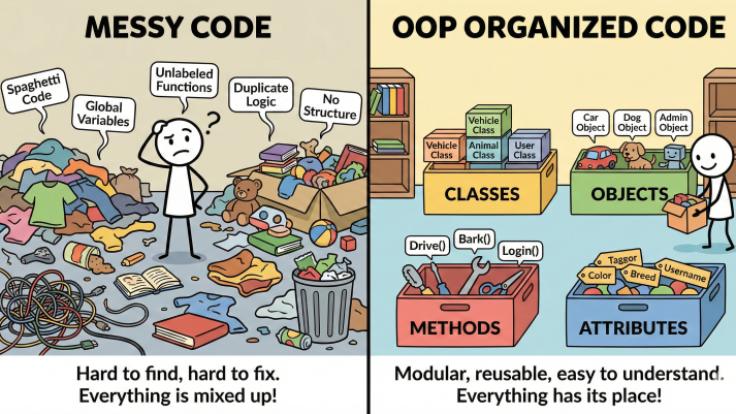
The Basics: Classes and Objects
🍪 The Class: The Cookie Cutter (The Blueprint)
A CLASS is the blueprint or the template. It defines what attributes (data) and methods (actions) the objects made from it will have.
- Imagine you have a Star-Shaped Cookie Cutter. This cutter is your Class named StarCookie.
- It tells you that every cookie made from it will have 5 points (an Attribute).
- It tells you that you can use it to Cut the dough (a Method).
class StarCookie:
# 🌟 Attributes (What the cookie IS)
shape = "Star"
points = 5
# 🛠️ Method (What the cookie cutter DOES)
def cut_dough(self, dough_type):
print(f"Cutting a {self.shape} cookie from {dough_type} dough.")

⭐ The Object: The Actual Cookie (The Real Thing)
An OBJECT is the actual item created from the blueprint. Each object can have unique details.
- You take your StarCookie cutter and use it to make actual cookies. Each cookie is an Object.
- cookie_1: This object is a Star Cookie. You decide to color it Blue and name it "Flash".
- cookie_2: This object is also a Star Cookie. You decide to color it Red and name it "Rocket".
# Create the Class (The Cookie Cutter Template)
class Cookie:
# Class Attribute: All cookies will have this by default
is_baked = True
# The Factory Worker: Sets up the unique features for *this* specific cookie
def __init__(self, color, flavor):
# Instance Attributes (unique to each object)
self.color = color
self.flavor = flavor
# Method (An action every cookie object can do)
def eat(self):
if self.is_baked:
print(f"Yum! Eating the {self.color}, {self.flavor} cookie.")
else:
print("This dough isn't ready yet!")
# 1. Create Object 1 (The first actual cookie)
blue_cookie = Cookie("Blue", "Vanilla")
# 2. Create Object 2 (The second actual cookie)
red_cookie = Cookie("Red", "Chocolate")
# 3. Access their unique attributes:
print(f"Cookie 1 is {blue_cookie.color} and {blue_cookie.flavor}.")
print(f"Cookie 2 is {red_cookie.color} and {red_cookie.flavor}.")
# 4. Make them perform the action (Method):
blue_cookie.eat()
red_cookie.eat()The Four Pillars: OOP's Superhero Powers
Encapsulation: The "Locker" or "Toy Box" 🎁

| Part | Concept | Example Code Snippet |
|---|---|---|
| The "Box" | Define the class | class Pet: |
| The "Toys" | Define the attributes (data) | self.name, self.species, self.mood |
| The "Lock/Method" | Define a method to change the mood | def give_food(self): |
class Pet:
# This is the special method that runs when you create a new pet (the "Factory")
def __init__(self, name, species):
self.name = name # Pet's name (Data)
self.species = species # Pet's species (Data)
self.mood = "Happy" # Every new pet is happy to start! (Data)
# Method: This function lets us change the pet's mood (Action/Control)
def give_food(self):
self.mood = "Very Happy and Full!"
print(f"** {self.name} is now {self.mood} **")
# 1. Create a Pet (Creating an "Object" or "Instance")
dog = Pet("Buddy", "Dog")
cat = Pet("Whiskers", "Cat")
# 2. Check the pet's mood (Accessing the data)
print(f"Buddy's current mood: {dog.mood}")
# 3. Give Buddy food (Calling the method/Action)
dog.give_food()
print(f"Buddy's new mood: {dog.mood}")Answer : Using a method keeps the control inside the "box" and allows you to add extra rules (e.g., if the pet is 'Happy', they can't take a nap!).
Inheritance: The Family Recipe 🛠️ (Sharing Code)

# Parent Class (The general blueprint/Family Recipe)
class Vehicle:
def __init__(self, speed):
self.speed = speed
self.engine_on = False
def start_engine(self):
self.engine_on = True
print("Vehicle engine starts with a low RUMBLE...")
# Child Class: Car (Inherits from Vehicle)
class Car(Vehicle):
# The Car automatically knows how to start_engine() from the Parent!
def honk_horn(self):
print("BEEP BEEP!")
# Child Class: Bike (Inherits from Vehicle)
class Bike(Vehicle):
# Bikes have a different way to start/move!
def start_engine(self): # OVERRIDING the parent's method (Polymorphism)
self.engine_on = True
print("Bike wheels start to spin...")
# 1. Create a Car object
my_car = Car(60)
# 2. The Car uses the method it inherited from Vehicle
my_car.start_engine()
# 3. The Car uses its own unique method
my_car.honk_horn()
# 4. Create a Bike object
my_bike = Bike(20)
my_bike.start_engine() # This calls the Bike's special start_engine, not the Vehicle's!Practice Question: "If we create a new class called Truck that inherits from Car, what methods does the Truck automatically have? If the Truck needs a new method called load_cargo(), where should we define that method?"
🕹️ Abstraction: The Remote Control (Simplification)
class Robot:
def _pick_up_toys(self): # Use a single underscore to suggest it's a 'private' detail
print("- Step 1: Picking up all toys.")
def _vacuum_floor(self): # Another private detail
print("- Step 2: Vacuuming the floor.")
# This is the public method (the "Power Button")
def clean_room(self):
print("\n--- Robot is starting the complex cleaning process! ---")
self._pick_up_toys()
self._vacuum_floor()
print("--- Cleaning done! ---")
# 1. Create the Robot
bot = Robot()
# 2. Call the simple, abstract method. The user doesn't see the steps!
bot.clean_room()Polymorphism: The "Do It Your Way" Rule (Flexibility)
class Lion:
def make_sound(self):
print("ROAR! I am a Lion!")
class Duck:
def make_sound(self):
print("Quack! I am a Duck!")
class Sheep:
def make_sound(self):
print("Baa! I am a Sheep!")
# Function that can take ANY animal and tell it to make a sound
def tell_to_make_sound(animal):
animal.make_sound()
# 1. Create the animal objects
lion = Lion()
duck = Duck()
sheep = Sheep()
# 2. Call the function with different objects.
# The SAME function call (tell_to_make_sound) gives a DIFFERENT result!
tell_to_make_sound(lion)
tell_to_make_sound(duck)
tell_to_make_sound(sheep)Practice Session
1️⃣ Create a Car class
You learn : attributes + methods + making objects
Task:
-
Make a class named Car
-
Add 2 attributes:
brand,color -
Add one method:
drive()→ prints"The car is driving" -
Create two car objects and call the method
2️⃣ Make a Pet class
You learn: understanding objects and properties
Task:
-
Create a class Pet
-
Attributes:
name,animal_type -
Method:
speak()→ prints sound based on animal (dog → "woof") -
Create 3 pets and call their sound
3️⃣ Build a Robot class
You learn: methods with parameters
Task:
-
Create a class Robot
-
Method:
greet(name)→ prints"Hello, name!" -
Create a robot object and greet different people
4️⃣ Create a Fruit class
You learn: multiple objects from same class
Task:
-
Attributes:
color,taste -
Make 3 fruits (apple, mango, banana)
-
Print their information using a method
5️⃣ Design a Student class
You learn: storing data inside objects
Task:
-
Attributes:
name,grade -
Method:
introduce()→ prints"My name is ___ and I am in ___ grade" -
Create objects for 5 students
📝 Your Coding Challenge: Build a Magic Pencil!
Time to test your knowledge of Classes, Objects, and Inheritance!
Challenge 1: The Magic Pencil
- Create a Class called
Pencil. - Give it an Attribute called
color, set in the__init__method. - Give it a Method called
draw_circle()that prints: "I am drawing a circle with the [pencil color] pencil." - Create two Objects:
pencil_a(color Blue) andpencil_b(color Yellow). - Make both pencils call the
draw_circle()method.
Challenge 2: Upgrade Time! (Inheritance)
Use your Pencil class from Challenge 1 for this one.
- Create a new Child Class called
SuperPencilthat **inherits** from your originalPencilclass. - Add a new, unique Method to
SuperPencilcalledwrite_letter()that prints: "The SuperPencil is writing a secret message!" - Create a new object:
super_pencil_c. Can it still call the inheriteddraw_circle()method? Try it!
Goal: Understand how one Class makes many unique Objects.
-
Design the Class (The Blueprint):
-
What will you name your Class? (e.g.,
RobotAssistant) -
What are the Class Attributes (things all robots share)?
-
Example:
number_of_wheels = 4
-
-
What are the Instance Attributes (things you can choose when you build the robot)?
-
Example:
color,nickname,main_job
-
-
What is one Method (action) the robot can do?
-
Example:
def say_hello(self):
-
-
-
Create Two Objects (The Actual Robots):
-
Use your class to build Robot 1:
-
my_clean_bot = RobotAssistant("Yellow", "Dusty", "Cleaning")
-
-
Use your class to build Robot 2:
-
my_game_bot = RobotAssistant("Green", "Zapper", "Playing Games")
-
-
-
Prove they are unique: Print out the
main_jobfor each robot and make each onesay_hello().


Write a Response